Return to MAIN-Index  Return to SUB-Index    IBM-AUSTRIA - PC-HW-Support    30 Aug 1999

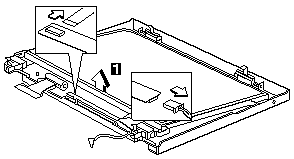
LCD Inverter ASM 14.1"


LCD Inverter ASM 14.1"


Note: See 'Setting the LCD Panel ID'.

To remove the LCD inverter ASM:
  1.  Disconnect the cable from the inverter board.
  2.  Lift the inverter board away from the display panel.


More INFORMATION / HELP is available at the  IBM-HelpCenter

Please see the LEGAL  -  Trademark notice.
Feel free - send a Email-NOTE  for any BUG on this page found - Thank you.