
Return to MAIN-Index  Return to SUB-Index    IBM-AUSTRIA - PC-HW-Support    30 Aug 1999

Working with drives in bays 1 through 4


Working with drives in bays 1 through 4

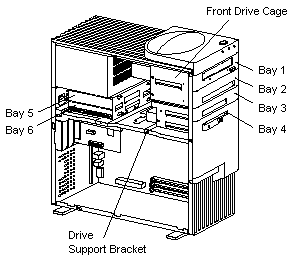
You install drives from the front of the server without removing the drive bay assembly. The drive bay assembly is permanently mounted to the chassis and cannot be removed.

  -Attention- The presence of 5 V ac standby power might result in damage to the hardware unless you disconnect the power cord from the electrical outlet before you open the server.
Notes:


Installing drives in the front drive bay assembly
Removing drives from the drive bay assembly
Installing a drive in the drive bay assembly
Removing the removable Drive Cage (8476)

Note: The front drive bay assembly is also known as the upper drive bay assembly.

The following illustration shows the server bays:


Back to  Jump to TOP-of-PAGE
More INFORMATION / HELP is available at the  IBM-HelpCenter

Please see the LEGAL  -  Trademark notice.
Feel free - send a Email-NOTE  for any BUG on this page found - Thank you.