 |

 IBM-AUSTRIA - PC-HW-Support 30 Aug 1999
 |
Speaker ASM 13.3"
Speaker ASM 13.3"
To remove the speaker:
- Carefully disconnect the speaker cable from the connector.
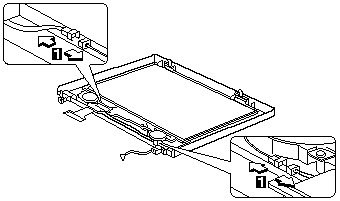
- Remove the five screws securing the speaker.
- Gently lift the speaker away from the display panel.
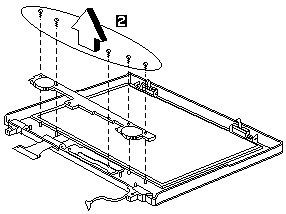
| Step |
Size (Quantity) |
Head & Color |
Torque |
| 2 |
M2 x 4L (5) |
Flat head, silver |
1.6 kgf-cm |
Note: Make sure you use the correct screw for replacement.
More INFORMATION / HELP is available at the IBM-HelpCenter
Please see the LEGAL - Trademark notice.
Feel free - send a  for any BUG on this page found - Thank you.