


|
|
|
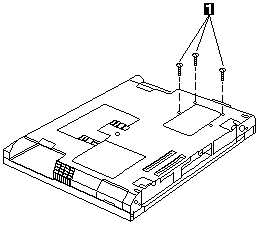
| Step | Size (Quantity) | Head & Color | Torque |
|---|---|---|---|
| 1 | M2 x 18L (3) | Pan head, black | 2.0 kgf-cm |
Note: Make sure you use the correct screw for replacement.
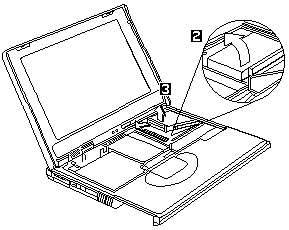
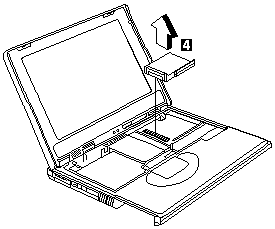
 CAUTION When reassebmling this section of the machine, the
upper heatsink must be reassembled first before the PCMCIA slots.
CAUTION When reassebmling this section of the machine, the
upper heatsink must be reassembled first before the PCMCIA slots.

Please see the LEGAL - Trademark notice.
Feel free - send a  for any BUG on this page found - Thank you.