 |

 IBM-AUSTRIA - PC-HW-Support 30 Aug 1999
 |
Checking the Car Battery Adapter (700 only)
Checking the Car Battery Adapter (700 only)
If the output voltage from the cigarette lighter socket of the
car is less than 10.5 Vdc, the power-on indicator on the
car battery adapter blinks and a noise can be heard continuously.
- Unplug the car battery adapter cable from the connector, if
connected.
- Plug the car battery adapter into the cigarette lighter socket.
NOTE: If the adapter is already plugged in, be sure to unplug the
adapter from the cigarette lighter socket, then plug it into
the socket again.
- Measure the output voltage of the car battery adapter cable.
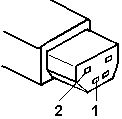
| Pin |
Voltage (Vdc) |
| 1 |
+19.0 to +21.0 |
| 2 |
Ground |
- If the voltage is correct and the power-on indicator
on the car battery adapter is on all the time, the car battery
is working correctly. Replace the voltage converter. If the
problem is not resolved when the voltage converter is replaced,
go to 'Checking the Voltage Converter (700, 700C) or
'Checking the Voltage Converter (720, 720C)
- If the voltage is outside the normal voltage range, do one of the
following:
- Try the above test procedures using a different car,
if one is available.
- Replace the car battery adapter if the computer works with the
AC adapter but does not work with the car battery adapter.
NOTE: If the output voltage from the cigarette lighter socket of the
car is less than 10.5 Vdc, the power-on indicator on the
car battery adapter blinks and a continuous
noise can be heard. Have the car battery serviced.
Back to 
More INFORMATION / HELP is available at the IBM-HelpCenter
Please see the LEGAL - Trademark notice.
Feel free - send a  for any BUG on this page found - Thank you.