 |

 IBM-AUSTRIA - PC-HW-Support 30 Aug 1999
 |
Checking the Voltage Converter (720, 720C)
Checking the Voltage Converter (720, 720C)
Use the following procedure to isolate a problem with
the ThinkPad 720, 720C voltage converter.
- Power-off the computer.
- Power-off all attached devices and disconnect them from the computer.
- Unplug the AC adapter cable, then remove the battery pack
from the computer.
- Carefully place the computer bottom-side up
and remove the bottom cover.
- Plug the AC adapter cable into the computer.
- Open the LCD half-way, then stand the computer
on its front edges so that the suspend switch is not activated.
- Power-on the computer.
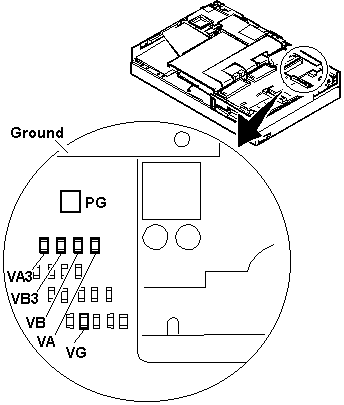
- Check the voltages of the voltage converter on the system board.
NOTE:
- Make sure the suspend switch (located to the left above the keyboard)
is not activated during measurement of the voltage.
- Only PG is marked on the system board.
Use the following figure to locate the VA, VG, VB, VA3, and VB3
signal names.
| Signal |
Vdc Min. |
Vdc Max. |
| VA |
+4.75 |
+5.25 |
| VG |
+4.75 |
+5.25 |
| VB |
+4.75 |
+5.25 |
| VA3 |
+3.42 |
+3.78 |
| VB3 |
+3.42 |
+3.78 |
| PWRGOOD |
+4.00 |
+5.25 |
- If any voltage is not correct, go to step 9
- If all voltages are correct, the voltage converter is
operating correctly. If the power problem did no reoccur, reconnect
the devices removed in step 2 to isolate a device problem.
- If all the voltages are correct and the power problem still exists, replace
the following FRUs one by one.
- System board
- Processor card
- Power-off the computer and unplug the AC adapter cable
from the computer.
- Check for a short circuit between Ground and VA, VG, VB, VA3 or VB3. The
following table shows which FRUs can cause a short at each signal.
- If there is a short circuit (less than 10 ohms), remove the FRUs indicated
one at a time until the short circuit disappears. Replace the FRU
causing the short circuit.
| FRU |
VA |
VG |
VB |
VA3 |
VB3 |
| Voltage converter |
x |
x |
x |
x |
|
| Processor card |
|
|
x |
|
x |
| System board |
x |
x |
x |
x |
x |
| Video card |
x |
|
x |
x |
x |
| Base memory card |
x |
|
|
|
|
| Keyboard control card |
x |
|
x |
|
|
| Math coprocessor |
|
|
x |
|
x |
| Diskette drive |
|
|
x |
|
|
| Hard disk drive |
|
|
x |
|
|
| LCD |
x |
|
|
|
|
| Indicator assembly |
|
x |
x |
|
|
- If there is no short circuit, replace the following
FRUs one at a time.
- Voltage converter
- System board
Back to 
More INFORMATION / HELP is available at the IBM-HelpCenter
Please see the LEGAL - Trademark notice.
Feel free - send a  for any BUG on this page found - Thank you.