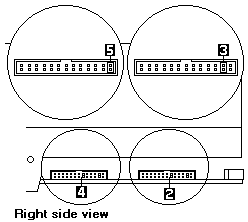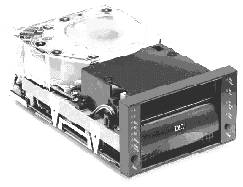
FRU P/N OPT P/N
-------------------------------------------
Tape Drive 5.25-Inch 28L1655 00K7900 - Pearl White
00K7898
-------------------------------------------
10L6049 04K0149 - Stealth Black
-------------------------------------------
Tape Cartridge 59H3040 (5-pack)
Cleaning Cartridge 59H3092
See > TIP Tape Drive Cleaning Strategies - Media/Cleaning-tape P/Ns
See > TIP H163783 (Netfinity 7000)
See > TIP H165409 DLT Firmware update
Requirements
Appr. height: 86.3mm (3.4 -Inch)
Appr. width: 148.3mm (5.84-Inch)
Appr. depth: 243.8mm (9.6 -Inch)
The CD also contains backup applications that are used with other
products but are not applicable to the 35/70GB DLT Internal Tape Drive.
Supported tapedrive configurations can be found on the IBM Server
Compatibility Webpage at:
http://www.pc.ibm.com/us/compat
External Tape Drive
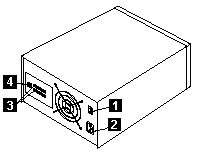
| 1 | Power switch |
|---|---|
| 2 | Power cord connector |
| 3 | SCSI interface connectors |
| 4 | SCSI ID-selection push switch |
Configuration jumperblocks
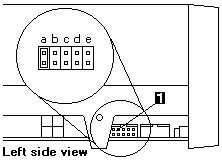
| 1 | SCSI ID jumperblock |
|---|---|
| 2 | SCSI termination power jumperblock |
| 3 | SCSI termination jumper |
| 4 | SCSI parity jumperblock |
| 5 | SCSI disable parity jumper |
Most SCSI adapters provide termination power.
However, if your SCSI adapter does not provide termination power, you
must place a jumper in the enable termination power position 3 on the jumperblock 2.
Check the documentation that come with the PC or SCSI adapter for more information.
If the system does not generate parity, you can disable parity checking by placing a jumper in the disable parity position
5 on the jumperblock 4.
The DLT-drive is shipped with default SCSI ID address 5, use the below table for setup the DLT-drive SCSI ID on SCSI ID jumperblock 1.
| SCSI-ID | pos-a | pos-b bit-8 |
pos-c bit-4 |
pos-d bit-2 |
pos-e bit-1 |
|---|---|---|---|---|---|
| 0 | ON | Off | Off | Off | Off |
| 1 | ON | Off | Off | Off | ON |
| 2 | ON | Off | Off | ON | Off |
| 3 | ON | Off | Off | ON | ON |
| 4 | ON | Off | ON | Off | Off |
| 5 | ON | Off | ON | Off | ON |
| 6 | ON | Off | ON | ON | Off |
| 7 | ON | Off | ON | ON | ON |
| 8 | ON | ON | Off | Off | Off |
| 9 | ON | ON | Off | Off | ON |
| 10 | ON | ON | Off | ON | Off |
| 11 | ON | ON | Off | ON | ON |
| 12 | ON | ON | ON | Off | Off |
| 13 | ON | ON | ON | Off | ON |
| 14 | ON | ON | ON | ON | Off |
| 15 | ON | ON | ON | ON | ON |
NOTE: The SCSI adapter can be part of the computer system board or can be an adapter installed in an expansion slot.
Using the Drive - Button / Indicators
(See drawing on left side)
| LED Button |
Function | Description |
|---|---|---|
| 1 | Write Protect (orange) |
When indicator is on, the tape is write protected. |
| 2 | Tape in Use (yellow) |
When indicator is blinking, the tape is in motion. When indicator lights steadily, the tape is loaded and ready for use. |
| 3 | Use Cleaning Tape (yellow) |
When indicator is on, the drive head needs cleaning, -or- the tape (media) is damaged, -or- the tape head is damaged. |
| 4 | Operate Handle (green) |
When indicator is on, the Cartridge Insert/Release handle can be lifted. When indicator blinking, push the handle down and wait for the indicator to turn solid green. |
| 5 | Unload | Press this button to unload a tape or to reset the tape drive. |
| 6 | Cartridge Insert/Release |
Lift this handle to insert or to remove a cartridge when the Operate Handle indicator lights. |
| 7 | Select | When the Density Override indicator 8 is flashing, you can press this button to cycle through tape capacity options. |
| 8 | Density Override (yellow) |
When indicator is lit, it indicates you use the Select button 7 to change tape capacity. |
| 9 | Compress (yellow) |
When indicator is lit, data compression is enabled. (Available in 10/15/20 and 35 GB density only) |
| 10 | 35.0 (yellow) |
When indicator lights steadily, the tape is recorded at 35.0 GB capacity. When indicator is blinking, it indicates you requested this capacity. |
| 11 | 20.0 (yellow) |
When indicator lights steadily, the tape is recorded at 20.0 GB capacity. When indicator is blinking, it indicates you requested this capacity. |
| 12 | 10.0/15.0 (yellow) |
When indicator lights steadily, the tape is recorded at 10.0 or 15.0 GB capacity. When indicator is blinking, it indicates you requested this capacity. |
| 13 | 6.0 (yellow) |
When indicator lights steadily, the tape is recorded at 6.0 GB capacity. When indicator is blinking, it indicates you requested this capacity. |
| 14 | 2.6 (yellow) |
When indicator lights steadily, the tape is recorded at 2.6 GB capacity. When indicator is blinking, it indicates you requested this capacity. |
Selecting Data Cartridges
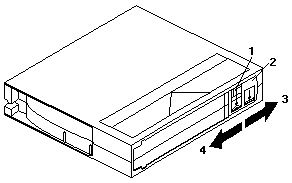
For writing data, use only DLT data cartridges
Any of the following data cartridges are acceptable and require no
formatting or other media conditioning before use.
Selecting Record Capacity
You might want to decrease tape capacity for compatibility with older tapedrives, or
increase capacity for better performance.
Insert a tape cartridge, and wait for the tape motion to stop and the Tape in Use indicator
to light steadily. The capacity indicators show the current tape capacity.
If they are not lit, it means the tape is blank.
Density changes can occur only when writing from the beginning of the tape. You cannot mix capacities on a single data cartridge.
Press Select button to change density.
When the Density Override indicator is blinking, you can press the Select button to
change the recording capacity of the tape.
Press the Select button until the desired capacity indicator is flashing.
The indicator will continue flashing until the tape drive begins recording in the new capacity. Then, the new capacity
indicator is on steadily (the old capacity indicator is off).
Product Specifications
Physical Specifications
---------------------------------------------------------------
Height (with bezel) 86.3mm (3.4-in)
Width (with bezel) 184.3mm (5.84-in)
Length (with bezel) 243.8mm (9.6-in)
Weight 2.9kg (6.7-lb)
Shipping weight 3.9kg (8.8-lb)
---------------------------------------------------------------
Input Voltages
Standard +5 Vdc and +12 Vdc ±5%
---------------------------------------------------------------
Maximum Sustained Data-Transfer Rates
Compressed data 10MB per second
Uncompressed data 5MB per second
---------------------------------------------------------------
Maximum Data Capacity
Tape Uncompressed Compressed
data (GB) data (GB)
DLTtape III 2.6, 6, 10 20
DLTtape IIIxt 15 30
DLTtape IV 20, 35 40, 70
IBM Data Cartridge 20, 35 40, 70
(P/N 59H3040)
---------------------------------------------------------------
SCSI Cable Specifications
Connector 68-pin male, shielded AMP 786090-7
Maximum length 3m (10ft)
---------------------------------------------------------------
Operating Environment
Tape path temperature
(operating) +10°C to +40°C (+50°F to +104°F)
(non-operating) -40°C to +66°C (-40°F to +150.8°F)
Relative humidity 20% to 80% non condensing
Wetbulb 25°C (77°F) maximum
Altitude -152 to 9.140m (-500 to +30.000-ft)

Please see the LEGAL - Trademark notice.
Feel free - send a  for any BUG on this page found - Thank you.