 |

 IBM-AUSTRIA - PC-HW-Support 30 Aug 1999
 |
IBM 20/40 GB Internal DLT Tape Drive (SCSI F/W)
IBM 20 / 40 GB DLT Internal Tape Drive
-IMPORTANT-  -ATTENTION-
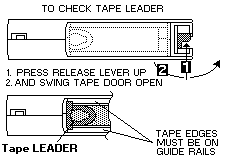
If you see a blinking STATUS Indicator #2 and the tape does'nt go to a ready status, then
maybe you have mounted a tape cartridge with a broken/defective TAPE LEADER.
Such a defective cartridge must be manually removed from the drive, and the Tape Drive-guide
must be placed/reseated to the home position, inside the tape drive (by a trained technician).
However, the easy way - before mounting a cleaning/data cartridge - visually check the TAPE LEADER !
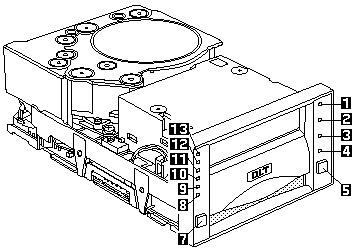
| 1 - 4 |
Statusindicators |
| 5 |
Unloadbutton |
| 6 |
Cartridge Insert/Release handle |
| 7 |
Selectbutton |
| 8 |
Density/Override indicator |
| 9 |
Compress indicator |
| 10 - 13 |
Tape Capacity indicators |
If all indicators are flashing, it indicates a hardware failure in
Resetting the Drive has occurred. Try to reset the drive by pressing the
tape UNLOAD button, or turn computer power off, then on again.
See Part-Two (fullscreen)