


|
|
|
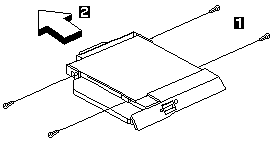
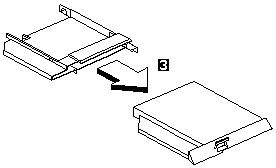
| Step | Size (Quantity) | Head & Color | Torque |
|---|---|---|---|
| 1 | M2.5x 4L (4) | Flat head, silver | 1.6 kgf-cm |
Note: Make sure you use the correct screw for replacement.
Please see the LEGAL - Trademark notice.
Feel free - send a  for any BUG on this page found - Thank you.