 |

 IBM-AUSTRIA - PC-HW-Support 30 Aug 1999
 |
1080 Keyboard Unit
1080 Keyboard Unit
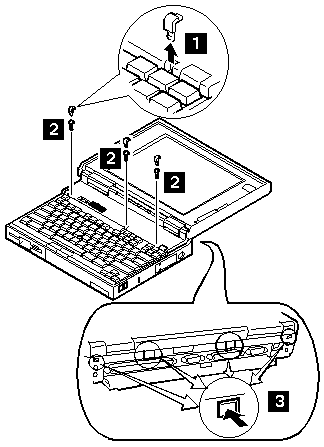
Loosen the three screws 2,
and push 3
to release the five top cover latches at the rear side of
the system unit.
When removing the screw covers 1,
use a small screwdriver.
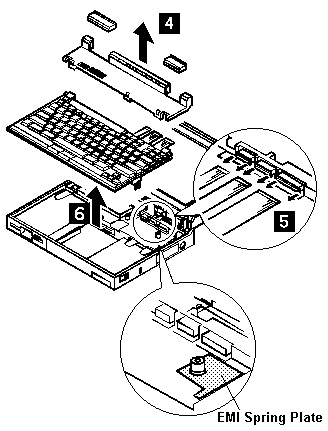
The keyboard unit is connected to the system board
with flexible cables.
Remove the upper cover, then disconnect the cables to remove the
keyboard unit as shown.
To remove the top cover, do not latch the keyboard.
Lower the keyboard and remove the top cover.
 Do not pull the keyboard cables.
The keyboard cables will be damaged if the keyboard
is disconnected without releasing the three latches 5
NOTE:
- When replacing the keyboard, check that
the three cables are clean, and
inserted straight and fully into the connectors.
Slide both ends of each latch at the same time
to make sure that each cable is correctly inserted.
Go to 'Keyboard / Auxiliary Input Device Checkout' and test all keys before returning the
computer to the customer.
- When replacing the top cover,
insert the four latches at the rear side of the cover
into the foot guide of the the LCD, push the right, left,
and front sides to snap it into place.
Use the following table for reference when replacing parts.
| Step |
Location (Quantity) |
Length |
| 2 |
Top cover (3) |
4 mm |
NOTE: Make sure you use the correct screw. Screw Size Chart
Back to 
More INFORMATION / HELP is available at the IBM-HelpCenter
Please see the LEGAL - Trademark notice.
Feel free - send a  for any BUG on this page found - Thank you.