 |

 IBM-AUSTRIA - PC-HW-Support 30 Aug 1999
 |
2100 Standby Battery and Front IR
2100 Standby Battery and Front IR
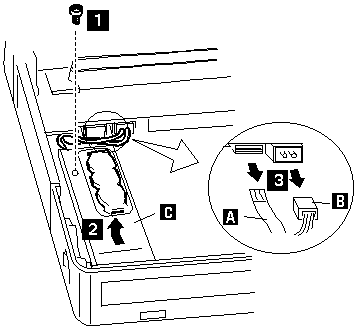
Where:
A is the IR Cable.
B is the Standby Battery Cable.
C is the IR Lens.
NOTE: When replacing the battery, make sure the battery
are seated correctly.
Make sure the IR lens 2 is in the correct position
by sliding it end to end.
| Step |
Location (Quantity) |
Length |
| 1 |
cover (1) |
4 mm |
NOTE: Make sure you use the correct screw. Screw Size Chart
 please READ - see
Back to 
More INFORMATION / HELP is available at the IBM-HelpCenter
Please see the LEGAL - Trademark notice.
Feel free - send a  for any BUG on this page found - Thank you.