 |

 IBM-AUSTRIA - PC-HW-Support 30 Aug 1999
 |
2090 Status Indicator
2090 Status Indicator
 Do not pull the status indicator cable.
The cable will be damaged if the status indicator
is disconnected without releasing the latch in step 2.
Do not pull the status indicator cable.
The cable will be damaged if the status indicator
is disconnected without releasing the latch in step 2.
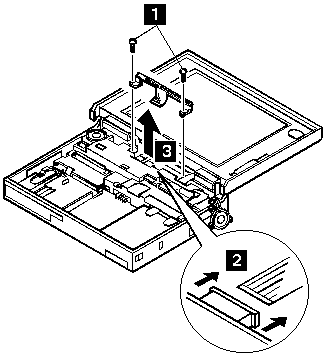
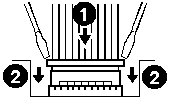
NOTE: When replacing the indicator,
insert the flexible cable straight into the connector until
the head of the cable stops.
Slide both ends of the latches at the same time
to make sure that the cable is correctly inserted.
Use the following table for reference when replacing parts.
| Step |
Location (Quantity) |
Length |
| 1 |
LED Stand off (2) |
14 mm |
NOTE: Make sure you use the correct screw. Screw Size Chart
Back to 
More INFORMATION / HELP is available at the IBM-HelpCenter
Please see the LEGAL - Trademark notice.
Feel free - send a  for any BUG on this page found - Thank you.