 |

 IBM-AUSTRIA - PC-HW-Support 30 Aug 1999
 |
Checking the Backup Battery
Checking the Backup Battery
- Power-off the computer and unplug the AC Adapter
from the computer.
- Open the keyboard, and remove the battery pack.
- Remove the backup battery from the shield assembly.
- Measure the voltage of the backup battery.
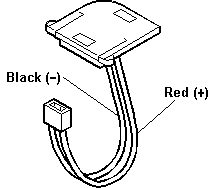
| Wire |
Voltage (Vdc) |
| Red |
+2.5 to +3.7 |
| Black |
Ground |
- If the voltage is correct, replace the system board.
- If the voltage is not correct, the backup battery has been
discharged. Replace the backup battery.
- If the backup battery discharges quickly after replacement,
replace the system board.
More INFORMATION / HELP is available at the IBM-HelpCenter
Please see the LEGAL - Trademark notice.
Feel free - send a  for any BUG on this page found - Thank you.