 |

 IBM-AUSTRIA - PC-HW-Support 30 Aug 1999
 |
Checking the Standby Battery
Checking the Standby Battery
NOTE:
Make sure that the battery pack is removed from the computer
before the standby battery is removed.
- Power-off the computer and unplug the AC adapter cable
from the computer.
- Remove the battery pack.
- Remove the indicator cover.
- Disconnect the standby battery connector from the voltage converter.
- Plug the AC adapter cable
into the computer and power-on the computer.
- Measure the output voltage at the connector on the voltage converter.
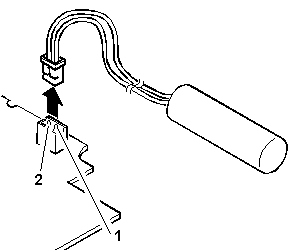
| Pin |
Voltage (Vdc) |
| 1 |
+4 |
| 2 |
Ground |
- If the voltage is less than +4 Vdc, replace the voltage
converter.
- If the voltage is more than +4 Vdc, go to the next step.
- Power-off the computer and unplug the AC adapter cable
from the computer.
- Reconnect the standby battery to the voltage converter.
- Plug the AC adapter cable into
the computer and power-on the computer.
Allow approximately 30 minutes for the standby battery to charge.
- Power-off the computer and unplug the AC adapter cable from the
computer and remove the standby battery.
- Measure the voltage of the standby battery.
- If the voltage is less than 3.5 Vdc, replace the standby battery.
Back to 
More INFORMATION / HELP is available at the IBM-HelpCenter
Please see the LEGAL - Trademark notice.
Feel free - send a  for any BUG on this page found - Thank you.