 |

 IBM-AUSTRIA - PC-HW-Support 30 Aug 1999
 |
Checking the Battery Pack
Checking the Battery Pack
- Carefully place the computer bottom-side up.
- Remove the battery pack and measure the voltage between the battery
terminals 1 (+) and 3 (-).
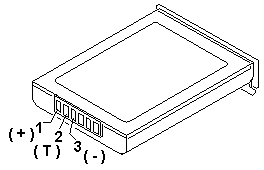
| Pin |
Voltage (Vdc) |
| 1 |
+10.0 to +18.0 |
| 2 |
Thermal Detection |
| 3 |
Ground |
- If the voltage is less than +10.0 Vdc, the battery pack has
been discharged or is defective.
- If the voltage is more than +10.0 Vdc,
go to the next step.
- Using an ohm meter, measure the resistance between
battery terminals 2 (T) and 3 (-).
The resistance must be 4 to 30 kilohms.
- If the resistance is not correct, replace the battery pack.
- If the resistance is correct, go to the next step.
- Install the battery pack and
plug the AC adapter cable
into the computer to charge the battery pack.
- If the battery power status indicator
is blinking (orange) and battery charging indicator
is on, replace the battery pack. If the battery is charging normally, the
battery is OK.
Back to 
More INFORMATION / HELP is available at the IBM-HelpCenter
Please see the LEGAL - Trademark notice.
Feel free - send a  for any BUG on this page found - Thank you.