 |

 IBM-AUSTRIA - PC-HW-Support 30 Aug 1999
 |
Checking the AC Adapter
Checking the AC Adapter
If the Power-On indicator does not turn-on, check the power
cord of the AC adapter for correct continuity and installation.
- If any noise can be heard from the AC adapter when it is
plugged into the ac power outlet, replace the AC adapter.
If no noise can be heard from the AC adapter,
go to step 3.
- If a noise is still heard from the new AC adapter, suspect
the computer. Replace the AC adapter with the original one, then
go to the next step. If no noise is heard from the new AC adapter,
the original AC adapter is defective.
- Unplug the AC adapter cable from the computer and
measure the output voltage at the plug of the AC adapter cable.
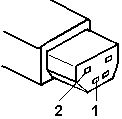
| Pin |
Voltage (Vdc) |
| 1 |
+19.0 to +21.0 |
| 2 |
Ground |
- If the voltage is not correct, go to the next step.
- Unplug the AC adapter cable from the ac power outlet and wait for
a few minutes.
- Plug the AC adapter cable into the ac power outlet.
- Measure the output voltage of the AC adapter.
- If the voltage is still not correct, replace the AC adapter.
- If the voltage is correct, plug the AC adapter
cable into the computer and try the failing operation again.
- If the problem goes away, suspect the continuity or installation
of the AC adapter cable.
- If the problem is not corrected, replace the voltage converter.
Back to 
More INFORMATION / HELP is available at the IBM-HelpCenter
Please see the LEGAL - Trademark notice.
Feel free - send a  for any BUG on this page found - Thank you.