 |

 IBM-AUSTRIA - PC-HW-Support 30 Aug 1999
 |
1090 LCD Assembly
1090 LCD Assembly
 If the LCD breaks and the fluid from inside the LCD
gets into your eyes or on your
hands, immediately wash the affected areas with
water for at least 15 minutes.
Seek medical care if any symptoms from the fluid
are present after washing.
Caring for the LCD
- When cleaning of the LCD becomes necessary,
gently wipe the LCD with a dry, soft cloth.
Do not use alcohol or detergent to clean the LCD.
- To avoid damage to the LCD,
do not scratch or apply any force to its surface.
- Do not put anything on the surface of the LCD.
- Do not pull the LCD cable.
The cable can be damaged if it is disconnected
without releasing the latch.
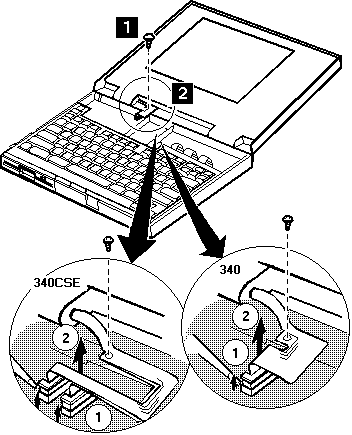
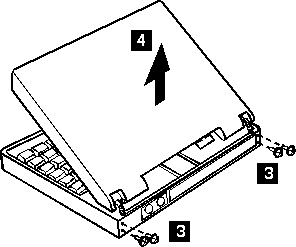
Use the following table for reference when replacing parts.
| Step |
Location (Quantity) |
Length |
| 1 |
LCD cable (1) |
6 mm |
| 3 |
LCD hinge (4) |
8 mm |
NOTE: Make sure you use the correct screw. Screw Size Chart
Back to 
More INFORMATION / HELP is available at the IBM-HelpCenter
Please see the LEGAL - Trademark notice.
Feel free - send a  for any BUG on this page found - Thank you.