 |

 IBM-AUSTRIA - PC-HW-Support 30 Aug 1999
 |
Checking the Standby Battery
Checking the Standby Battery
 Be careful not to cause a short circuit when measuring the voltage.
- Power-off the computer and unplug the AC Adapter
from the computer.
- Remove the standby battery.
- Measure the voltage of the standby battery.
- If the voltage between red and black
is 3.5 Vdc or greater, the voltage is
correct.
Go to Step 9
to verify standby battery operation.
- If the voltage is less than 3.5 Vdc, go to the next step.
- Plug the AC Adapter
into the computer and power-on the computer.
- Measure the output voltage at the connector on the system board.
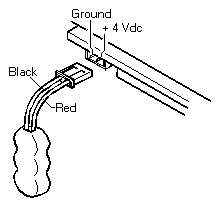
| Pin |
Voltage (Vdc) |
| + |
+4.0 |
| - |
Ground |
- If the voltage is less than +4.0 Vdc,
replace the system board.
- If the voltage is more than +4.0 Vdc, power-off the computer,
replace the standby battery, and go to the next step.
- Ensure that the AC Adapter is plugged into
the computer, then power-on the computer.
- Charging of the standby battery starts.
A depleted battery needs approximately 30
minutes to be recharged to the operational voltage of +3.5 Vdc.
- Unplug the AC Adapter.
- Verify the standby battery function by removing and installing
the battery pack during suspend mode.
NOTE:
Removing and installing the battery pack during suspend mode
should be done within one minute.
The resume operation must start.
If the
resume operation does not work, switching of power from the battery
pack to standby battery
will not be correct. Replace the system board.
Back to 
More INFORMATION / HELP is available at the IBM-HelpCenter
Please see the LEGAL - Trademark notice.
Feel free - send a  for any BUG on this page found - Thank you.