 |

 IBM-AUSTRIA - PC-HW-Support 30 Aug 1999
 |
Checking the Battery Pack
Checking the Battery Pack
- Power-off the computer.
- Remove the battery pack and measure the voltage between battery
terminals 1 (+) and 4 (-).
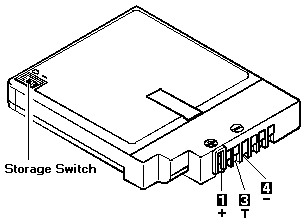
Voltage (Vdc) / Signal
| Terminal |
340 (NiCd) |
340CSE (NiMH) |
| 1 |
+10.0 to +18.0 |
+10.0 to +16.0 |
| 2 |
NC |
0 Ohm ground (-) |
| 3 |
10 KOhm ground (-) |
10 KOhm ground (-) |
| 4 |
Ground (-) |
Ground (-) |
- If the voltage is less than +10.0 Vdc, the battery pack has
been discharged or is defective.
Recharge the battery.
If the recharging does not work,
go to Step 5 to check the charging circuit.
If the voltage is still less than +10.0 Vdc after the recharging,
replace the battery.
- If the voltage is more than +8.0 Vdc,
measure the resistance between
battery terminals 3 and 4.
The resistance must be 4 to 30 kilohms.
If the resistance is not correct , replace the battery pack.
If the resistance is correct , replace the system board.
- To check the charging circuit, do the following.
Plug in the AC Adapter with the battery pack removed, then
power-on the computer.
- Measure the charging voltage between terminals
1 (+) and 4 (-) on the computer.
- If the voltage is less then +10.0 Vdc, replace
the system board.
If the voltage is more than +10.0 Vdc, the charging circuit is
working correctly, replace the battery pack.
Back to 
More INFORMATION / HELP is available at the IBM-HelpCenter
Please see the LEGAL - Trademark notice.
Feel free - send a  for any BUG on this page found - Thank you.